So, Bernie was quick and gave me access to our new server where just finished installing AMO by translating the instructions here to Intrepid. Everything ran smoothly and we have it up and running now: http://addons.sugarlabs.org
This is in early test stages and data will be often cleared as we install new versions. The main intent of this public server is for the people that wish to get involved in this effort to have a common place where to put their advances.
Stuff left to do:
- Fix search
- Fix downloads
- Lots of testing, debugging and fixing
- Upstream all patches that can make easier future rebases (and have a chance of being accepted)
- Choose a domain name, I'm not sure 'addons' is the best one
- Translate our new strings
- Change the design accordingly to the Sugar image
- ...
People interested in joining could take the http://sugarlabs.org/go/DevelopmentTeam/a.s.o namespace and set up some pages to coordinate themselves. Or maybe somewhere inside http://sugarlabs.org/go/InfrastructureTeam . The skills required are those of a php web developer.
Saturday, December 20, 2008

addons.mozilla.org for Sugar
During the last two weeks I have been working on adapting Mozilla's addons site to the Sugar needs.

After some fighting with php code and basing on previous work from David Farning, managed to install it in a virtual machine and write some patches so that AMO accepts activity bundles.
Bernie is going to resume the work where I left and I hope we'll have a test instance in a public server sometime soon. Then we'll need to give it some testing, fix the remaining bugs and customize the look to SugarLab's graphical identity.
Also, as we are forking their code, we are going to update regularly with upstream and maintain our set of patches, that I hope can keep small and not too intrusive. There are also some opportunities to upstream some work that can make this work lighter, as Mozilla is also interested in making easier adding new addon types.
So there's quite a bit of work left to do, but I believe that this project will give Sugar much more projection. I see as fundamental to our goals that it's as easy as possible to discover and install new activities and to publish new ones. If you have php coding skills, please give a hand!

After some fighting with php code and basing on previous work from David Farning, managed to install it in a virtual machine and write some patches so that AMO accepts activity bundles.
Bernie is going to resume the work where I left and I hope we'll have a test instance in a public server sometime soon. Then we'll need to give it some testing, fix the remaining bugs and customize the look to SugarLab's graphical identity.
Also, as we are forking their code, we are going to update regularly with upstream and maintain our set of patches, that I hope can keep small and not too intrusive. There are also some opportunities to upstream some work that can make this work lighter, as Mozilla is also interested in making easier adding new addon types.
So there's quite a bit of work left to do, but I believe that this project will give Sugar much more projection. I see as fundamental to our goals that it's as easy as possible to discover and install new activities and to publish new ones. If you have php coding skills, please give a hand!
Mind mapping SugarCamp '08
John Tierney was busy during the SugarCamp and draw several mind maps about what was discussed during the talks.

So check them out if you couldn't attend or if you would like to rethink a bit about those issues.

So check them out if you couldn't attend or if you would like to rethink a bit about those issues.
Friday, December 19, 2008
New feature: Object transfer in the journal
So these two last weeks were about coding. Landed the first batch of patches that bring file transfer to the journal and, though more or less working, still need a lot of love and polishing. Next week plan to resume work on file transfer as the last days I have been working on adapting http://addons.mozilla.org to serve activities. More on this in the next post.
The plan is to implement Eben's spec:

As an important implementation detail, we are using Telepathy as a central piece of our collaboration stack, and the mechanism we use for transferring files is the same that an instant messaging client would use to transfer files from GNOME, etc. Right now, telepathy supports only file transfer in its Salut backend (so LAN only) but in the near future we expect to have it added to the Jabber backend so we'd get for free file transfer supported in all our collaboration scenarios.
A big thanks to the telepathy guys at Collabora for their support and great work. And special thanks to Guillaume for his patience at answering my questions.
The plan is to implement Eben's spec:

As an important implementation detail, we are using Telepathy as a central piece of our collaboration stack, and the mechanism we use for transferring files is the same that an instant messaging client would use to transfer files from GNOME, etc. Right now, telepathy supports only file transfer in its Salut backend (so LAN only) but in the near future we expect to have it added to the Jabber backend so we'd get for free file transfer supported in all our collaboration scenarios.
A big thanks to the telepathy guys at Collabora for their support and great work. And special thanks to Guillaume for his patience at answering my questions.
Thursday, December 11, 2008
Again a volunteer
Monday was my last day as a contractor for OLPC. Has been hard to work with these guys but now I feel grateful that for almost two years I have been given the chance to work together with them in so many hard issues. They for sure have many interesting challenges to tackle and the technical ones aren't by far the most difficult.
I'm not going very far for some time, though. My plan now is to keep working in Sugar as a volunteer for as long as my savings last. Just as I was a volunteer for OLPC before they contracted me.
As I have written recently here, many people and organizations outside from OLPC have shown enormous interest in Sugar as a learning platform, so my goal now is to make possible for as many people to collaborate in SugarLabs as it can be. We need more deployers, developers, testers, writers, educators, designers,... and I trust we are on the right path to offer them a place where everybody can play. Be from local labs or the global SugarLabs.
So I'm happy because now I'll be able to focus all my energy on improving Sugar and help taking it to more children. Now I need to stop blogging nonsense and go back coding ;)
I'm not going very far for some time, though. My plan now is to keep working in Sugar as a volunteer for as long as my savings last. Just as I was a volunteer for OLPC before they contracted me.
As I have written recently here, many people and organizations outside from OLPC have shown enormous interest in Sugar as a learning platform, so my goal now is to make possible for as many people to collaborate in SugarLabs as it can be. We need more deployers, developers, testers, writers, educators, designers,... and I trust we are on the right path to offer them a place where everybody can play. Be from local labs or the global SugarLabs.
So I'm happy because now I'll be able to focus all my energy on improving Sugar and help taking it to more children. Now I need to stop blogging nonsense and go back coding ;)
Saturday, December 6, 2008
Why Sugar?
Or rather, why to spend a significant part of my life in this project?
To make it short, it's because I see how computers have failed many people around me.
I was lucky to grow in a family that, though not affluent, had ready access to computers. First it was a Macintosh (128K), then came a Mitsubishi MSX and in the next 15 years several models of Apple and PC-compatibles followed. One outcome of this was that my brother and me grew up playing, programming and tinkering with the different platforms, and my mother earned a live with desktop publishing. But, my sister, father and grandparents (who lived in a flat below ours) didn't particularly benefited from those computers. Why?
In a similar way, about 90% of my classmates only ever used computers during their studies because we passed one hour every week in the computer lab and a teacher would evaluate their knowledge about how to put files inside folders, use bold and italic fonts in text documents and sum up columns of numbers. At the end, they didn't benefited from the computers they had access to. Why?
Perhaps it's because those totally capable people couldn't justify in their minds to spend an indeterminate amount of effort in order to gain a very fuzzy benefit, something very reasonable, I would say. During the last 10 years, our societies have increased awareness of the benefits of computing, so more and more people have decided to make bigger efforts to use computers. But we are still failing a very significant part of our communities. Why?
Maybe, because the effort required to use computers hasn't decreased much during these years. That's why I think that the UIs that so efficiently geeks like me are using aren't enough when we want to bring the benefits of computers to all people.
And how can Sugar help to improve this situation? I see Sugar as two things in this regard: a common place where people who care about extending access to computing can work together, and a software platform where we are free to break assumptions and provide a better user experience to the use case we care most about: education.
If you go to the Ubuntu forums or call Microsoft's user support and propose a change to their software that benefits the educational use of their software but needs to change in some way how office workers use their UI, you will be told more or less politely to go ask somewhere else. But not in Sugar, as we have the power to actually change things and will welcome any idea that improves how people learn with their computers.
In case it's not clear yet, I understand how people that are happy with how they use their computers today can find Sugar a waste of time and how they can decide to be opposed to many computers around them run such an unfamiliar UI. But what I want to stress is that we are not saying that we are going to make Sugar a platform _you_ will be happier to use (though we'd love that, of course), what we say is that something is wrong with today's computers and something needs to be done.
So, share your ideas (and code!) about why Sugar sucks and how it can be improved. But please, stop repeating that existing desktops are just fine and we shouldn't be reinventing the wheel. From where I stand, I only see squared wheels and there must be something better!
To make it short, it's because I see how computers have failed many people around me.
I was lucky to grow in a family that, though not affluent, had ready access to computers. First it was a Macintosh (128K), then came a Mitsubishi MSX and in the next 15 years several models of Apple and PC-compatibles followed. One outcome of this was that my brother and me grew up playing, programming and tinkering with the different platforms, and my mother earned a live with desktop publishing. But, my sister, father and grandparents (who lived in a flat below ours) didn't particularly benefited from those computers. Why?
In a similar way, about 90% of my classmates only ever used computers during their studies because we passed one hour every week in the computer lab and a teacher would evaluate their knowledge about how to put files inside folders, use bold and italic fonts in text documents and sum up columns of numbers. At the end, they didn't benefited from the computers they had access to. Why?
Perhaps it's because those totally capable people couldn't justify in their minds to spend an indeterminate amount of effort in order to gain a very fuzzy benefit, something very reasonable, I would say. During the last 10 years, our societies have increased awareness of the benefits of computing, so more and more people have decided to make bigger efforts to use computers. But we are still failing a very significant part of our communities. Why?
Maybe, because the effort required to use computers hasn't decreased much during these years. That's why I think that the UIs that so efficiently geeks like me are using aren't enough when we want to bring the benefits of computers to all people.
And how can Sugar help to improve this situation? I see Sugar as two things in this regard: a common place where people who care about extending access to computing can work together, and a software platform where we are free to break assumptions and provide a better user experience to the use case we care most about: education.
If you go to the Ubuntu forums or call Microsoft's user support and propose a change to their software that benefits the educational use of their software but needs to change in some way how office workers use their UI, you will be told more or less politely to go ask somewhere else. But not in Sugar, as we have the power to actually change things and will welcome any idea that improves how people learn with their computers.
In case it's not clear yet, I understand how people that are happy with how they use their computers today can find Sugar a waste of time and how they can decide to be opposed to many computers around them run such an unfamiliar UI. But what I want to stress is that we are not saying that we are going to make Sugar a platform _you_ will be happier to use (though we'd love that, of course), what we say is that something is wrong with today's computers and something needs to be done.
So, share your ideas (and code!) about why Sugar sucks and how it can be improved. But please, stop repeating that existing desktops are just fine and we shouldn't be reinventing the wheel. From where I stand, I only see squared wheels and there must be something better!
Thursday, December 4, 2008
Walk through a small modification to Sugar
Some weeks ago, Sugar gained a general way for inspecting the source of any activity:
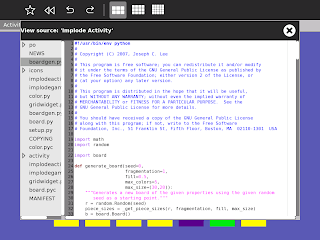
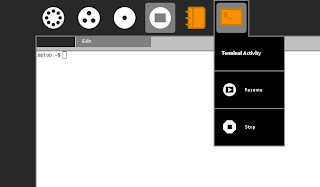
On OLPC's XO, that dialog is triggered by hitting Fn+space, and the space bar is conveniently tagged with a gear to indicate that. But we want Sugar to run equally well on other machines, so if we use a shortcut like alt-ctrl-v, we need to display it in the UI somehow so it's discoverable. One solution is to add an entry to the activity palette and show the shortcut there. This is the palette before the modification:
I'm going to do this modification and will try to explain here the process I followed. Please ask in the comments below any clarifications you need, though I'm going to assume that you have managed to install and run successfully sugar in jhbuild, see http://sugarlabs.org/go/DevelopmentTeam/Jhbuild for more details.
Also, you will need to have some knowledge of PyGTK in order to do similar modifications of Sugar, though going through the PyGTK tutorial should be enough: http://www.pygtk.org/pygtk2tutorial/index.html
So, first thing is to check out where is the palette (menu) that we want to add the item to. For that, one way is to see a string that appears in that palette and grep the shell sources for it:
$ cd ~/sugar-jhbuild/source/sugar
$ grep -R Resume src
That results in four files, so we need to decide which one is the right one:
src/jarabe/journal/palettes.py: resume_label = _('Resume')
src/jarabe/journal/journaltoolbox.py: self._resume.set_tooltip(_('Resume'))
src/jarabe/desktop/meshbox.py: item = MenuItem(_('Resume'), 'activity-start')
src/jarabe/view/palettes.py: menu_item = MenuItem(_('Resume'), 'activity-start')
The modification we want to do is not in the journal nor in the mesh view, so we decide we are going to look into src/jarabe/view/palettes.py.
If we search inside that file, we can see that that line is inside the constructor of CurrentActivityPalette, so that seems indeed the place where we want to add the view source menu item.
So with a bit of copy pasting, we can base on the Resume menu item and add our View source one:
diff --git a/src/jarabe/view/palettes.py b/src/jarabe/view/palettes.py
index 5ba2cc2..ca7b079 100644
--- a/src/jarabe/view/palettes.py
+++ b/src/jarabe/view/palettes.py
@@ -63,6 +63,12 @@ class CurrentActivityPalette(BasePalette):
self.menu.append(menu_item)
menu_item.show()
+ # TODO: ask Eben for a nice icon for this menu entry
+ menu_item = MenuItem(_('View source'), 'activity-start')
+ menu_item.connect('activate', self.__view_source_activate_cb)
+ self.menu.append(menu_item)
+ menu_item.show()
+
# TODO: share-with, keep
separator = gtk.SeparatorMenuItem()
@@ -77,6 +83,9 @@ class CurrentActivityPalette(BasePalette):
def __resume_activate_cb(self, menu_item):
self._home_activity.get_window().activate(gtk.get_current_event_time())
+ def __view_source_activate_cb(self, menu_item):
+ logging.debug('View source menu item was activated!')
+
def __stop_activate_cb(self, menu_item):
self._home_activity.get_window().close(1)
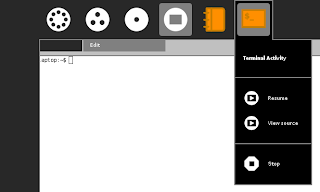
So, after running make install and sugar-emulator, we can see how the launched activities have that extra menu item:
And what happens when we click on it? An error :(
Traceback (most recent call last):
File "/home/tomeu/sugar-jhbuild/install/lib/python2.5/site-packages/jarabe/view/palettes.py", line 87, in __view_source_activate_cb
logging.debug('View source menu item was activated!')
NameError: global name 'logging' is not defined
You can see those lines printed in the same terminal window where you ran sugar-emulator. The problem is a missing import logging so we can just add that and try again.
The next step is to add an accelerator to that menu item, and finally actually do something when the user clicks on that menu item, but that will have tomorrow as I _really_ need to go cook dinner.

On OLPC's XO, that dialog is triggered by hitting Fn+space, and the space bar is conveniently tagged with a gear to indicate that. But we want Sugar to run equally well on other machines, so if we use a shortcut like alt-ctrl-v, we need to display it in the UI somehow so it's discoverable. One solution is to add an entry to the activity palette and show the shortcut there. This is the palette before the modification:

I'm going to do this modification and will try to explain here the process I followed. Please ask in the comments below any clarifications you need, though I'm going to assume that you have managed to install and run successfully sugar in jhbuild, see http://sugarlabs.org/go/DevelopmentTeam/Jhbuild for more details.
Also, you will need to have some knowledge of PyGTK in order to do similar modifications of Sugar, though going through the PyGTK tutorial should be enough: http://www.pygtk.org/pygtk2tutorial/index.html
So, first thing is to check out where is the palette (menu) that we want to add the item to. For that, one way is to see a string that appears in that palette and grep the shell sources for it:
$ cd ~/sugar-jhbuild/source/sugar
$ grep -R Resume src
That results in four files, so we need to decide which one is the right one:
src/jarabe/journal/palettes.py: resume_label = _('Resume')
src/jarabe/journal/journaltoolbox.py: self._resume.set_tooltip(_('Resume'))
src/jarabe/desktop/meshbox.py: item = MenuItem(_('Resume'), 'activity-start')
src/jarabe/view/palettes.py: menu_item = MenuItem(_('Resume'), 'activity-start')
The modification we want to do is not in the journal nor in the mesh view, so we decide we are going to look into src/jarabe/view/palettes.py.
If we search inside that file, we can see that that line is inside the constructor of CurrentActivityPalette, so that seems indeed the place where we want to add the view source menu item.
So with a bit of copy pasting, we can base on the Resume menu item and add our View source one:
diff --git a/src/jarabe/view/palettes.py b/src/jarabe/view/palettes.py
index 5ba2cc2..ca7b079 100644
--- a/src/jarabe/view/palettes.py
+++ b/src/jarabe/view/palettes.py
@@ -63,6 +63,12 @@ class CurrentActivityPalette(BasePalette):
self.menu.append(menu_item)
menu_item.show()
+ # TODO: ask Eben for a nice icon for this menu entry
+ menu_item = MenuItem(_('View source'), 'activity-start')
+ menu_item.connect('activate', self.__view_source_activate_cb)
+ self.menu.append(menu_item)
+ menu_item.show()
+
# TODO: share-with, keep
separator = gtk.SeparatorMenuItem()
@@ -77,6 +83,9 @@ class CurrentActivityPalette(BasePalette):
def __resume_activate_cb(self, menu_item):
self._home_activity.get_window().activate(gtk.get_current_event_time())
+ def __view_source_activate_cb(self, menu_item):
+ logging.debug('View source menu item was activated!')
+
def __stop_activate_cb(self, menu_item):
self._home_activity.get_window().close(1)
So, after running make install and sugar-emulator, we can see how the launched activities have that extra menu item:

And what happens when we click on it? An error :(
Traceback (most recent call last):
File "/home/tomeu/sugar-jhbuild/install/lib/python2.5/site-packages/jarabe/view/palettes.py", line 87, in __view_source_activate_cb
logging.debug('View source menu item was activated!')
NameError: global name 'logging' is not defined
You can see those lines printed in the same terminal window where you ran sugar-emulator. The problem is a missing import logging so we can just add that and try again.
The next step is to add an accelerator to that menu item, and finally actually do something when the user clicks on that menu item, but that will have tomorrow as I _really_ need to go cook dinner.
Subscribe to:
Posts (Atom)